![TripCreator_logo_on_white.png]](https://articles.tripcreator.com/hs-fs/hubfs/TripCreator_logo_on_white.png?height=40&name=TripCreator_logo_on_white.png)
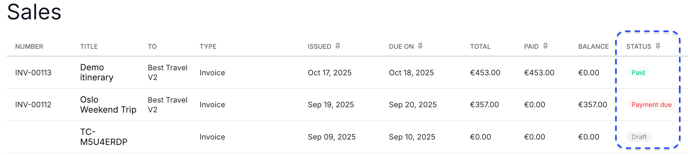
Invoices created in TripCreator can be found in your Sales module, where you can also track their status.
The different invoice statuses are:
-
Draft: The invoice has been created but not yet issued or sent to the client. It can still be edited in this state.
-
Awaiting Payment: The invoice has been issued, or issued and sent to the client; the payment has not been added manually, or the client has not yet completed the checkout process. The payment is still within the due date.
-
Awaiting Allocation: The invoice was issued in TripCreator but not sent to the client; the payment can be added manually to this invoice.
-
Payment Due: The invoice’s configured payment date has passed without payment being added or the client completing the checkout process.
-
Paid: Payment has been added manually, or the client has completed the checkout process if the invoice was sent.
-
Credit: This indicates a correction or adjustment to a previously issued invoice.