![TripCreator_logo_on_white.png]](https://articles.tripcreator.com/hs-fs/hubfs/TripCreator_logo_on_white.png?height=40&name=TripCreator_logo_on_white.png)
The branding settings include a logo, favicon icon and brand colours.
To configure your branding settings follow these steps:
- From the left-hand menu, choose Settings and then General Settings.
- Navigate to the Branding tab.
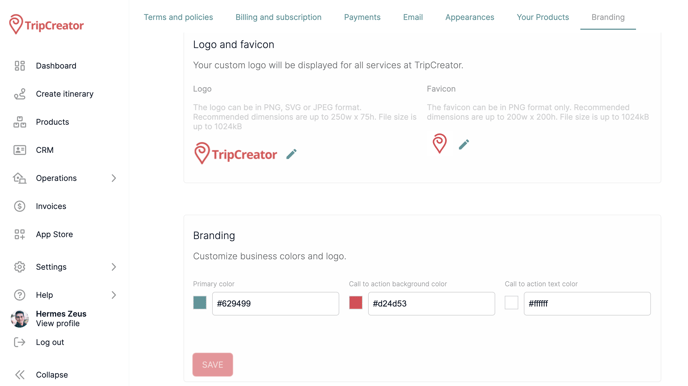
On this page, save the logo and favicon by clicking on the pencil button.
Configure the primary colour and the call-to-action colours for your itineraries by entering the colour codes or using the colour picker.
Specifications for the logo:
The logo can be in PNG, SVG or JPEG format. Recommended dimensions are up to 250w x 75h. File size can be up to 1024kB.
Specifications for the favicon:
The favicon can be in PNG format only. Recommended dimensions are up to 200w x 200h.
File size can be up to 1024kB.
Important: The branding settings will apply to all of your itineraries, except for the ones that have appearances with individual branding settings configured.